
How to Add an Online Appointment Booking System to Your WordPress Website
Think about how customers usually book appointments with your business. Some call your office, others send a WhatsApp message, and many fill out a contact form expecting someone to get back to them. While these methods work, they often involve several messages or calls before an appointment is finally confirmed. Now consider a customer who visits your website after business hours. They are interested in your service and ready to book an appointment, but the only option available is to leave a message and wait for a response. By the time your team contacts them, they may have already booked with another provider.
This is where an online appointment booking system becomes useful. By adding appointment booking functionality to your WordPress website, customers can check available time slots, select a service, and schedule appointments directly from your website. Depending on the booking solution, businesses can also manage staff availability, send confirmation notifications, accept online payments, and allow customers to reschedule appointments. For clinics, salons, consultants, training institutes, and other service-based businesses, this feature can make the booking experience more convenient while reducing the time spent coordinating appointments manually.
What Is an Online Appointment Booking System?
An online appointment booking system is a website feature that allows customers to schedule appointments without having to contact the business directly. Instead of submitting a general inquiry and waiting for confirmation, visitors can select a service, choose an available date and time, enter the required details, and complete their booking. For example, consider a dental clinic that receives appointment inquiries throughout the day. Without an online booking system, the receptionist needs to answer calls, check the doctor’s schedule, confirm availability, and record each appointment manually.
With an appointment booking system integrated into the clinic’s WordPress website, patients can view available slots and request or confirm appointments online. The booking details are recorded in the system, and confirmation notifications can be sent to the patient and clinic staff. The same functionality can be useful for businesses offering consultations, beauty treatments, fitness sessions, property visits, and professional services.
Why Should You Add Appointment Booking to Your WordPress Website?
Your business website should do more than explain your services. It should also make it easy for interested customers to take the next step. For appointment-based businesses, that next step is often booking a consultation or scheduling a service.
- Allow Customers to Book Appointments Anytime: Customers may visit your website outside normal business hours. Someone might want to schedule a consultation in the evening or book a salon appointment during their lunch break. An online appointment booking system allows visitors to schedule appointments at their convenience without waiting for your staff to respond. You can configure the system to display only the dates and time slots when your business accepts appointments. This means customers can make bookings at any time while your actual service availability remains under your control.
- Reduce Manual Appointment Coordination: When appointments are managed through phone calls, messages, and spreadsheets, employees may spend considerable time checking schedules and confirming bookings. An online booking system provides a central place to view appointment requests, upcoming schedules, and customer details. Instead of checking multiple conversations to find booking information, staff can review appointments through the booking dashboard. This is particularly useful for businesses receiving frequent appointment requests or managing several employees.
- Prevent Double Bookings: Double bookings can occur when multiple employees manage appointments without access to the same updated schedule. A properly configured booking system can prevent customers from selecting time slots that have already been reserved. For businesses with multiple service providers, availability can also be managed individually. For example, a salon with four stylists can maintain separate schedules for each employee, allowing customers to select an available stylist and appointment time.
- Improve the Customer Experience: Customers appreciate a booking process that is clear and convenient. Instead of exchanging several messages to confirm availability, they can view available services, select a time, and receive booking information through the website. Depending on the booking software, customers may also receive confirmation emails, appointment reminders, and options to reschedule or cancel. These features make it easier for customers to manage their appointments while helping businesses maintain an organized schedule.
How Does an Online Appointment Booking System Work?
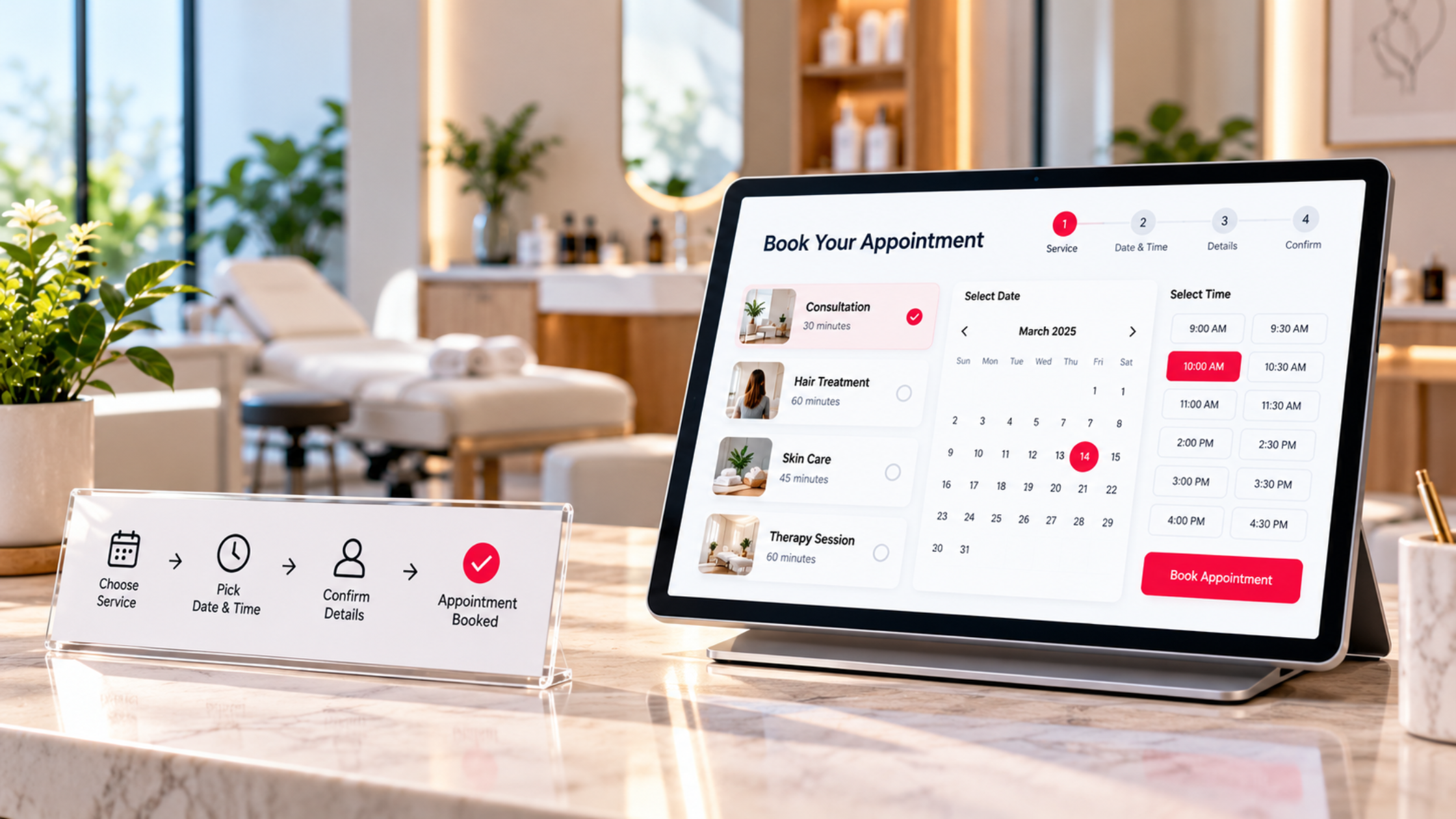
The booking process generally starts when a customer visits a dedicated appointment page or clicks a Book Appointment button on your website. The customer selects the service they want to book. This could be a consultation, treatment, training session, or another service offered by the business. Next, the system displays available dates and time slots based on the configured working hours, employee schedules, and existing appointments.
After choosing a suitable time, the customer enters the required contact information, such as their name, phone number, and email address. Depending on the booking configuration, the appointment may be confirmed immediately or submitted for approval by the business. Once confirmed, the booking is recorded in the system. Confirmation notifications can be sent to the customer and relevant staff members, and the appointment may also be added to a connected calendar. Businesses can customize this process according to their services and operational requirements.
Essential Features of a WordPress Appointment Booking System
Not every business requires the same appointment scheduling functionality. A consultant offering one-hour meetings may need a basic booking calendar, while a clinic managing multiple doctors may require individual schedules, different appointment categories, and more detailed availability settings. Before selecting a booking solution, consider the features your business actually needs.
1. Real-Time Availability Calendar
An availability calendar allows customers to view the dates and time slots currently open for booking. The calendar should reflect your configured working hours, holidays, breaks, and existing appointments. When a customer books an available slot, the system should update availability according to its scheduling rules to help prevent conflicting appointments. This allows businesses to manage bookings without manually checking availability for every inquiry.
2. Multiple Services and Appointment Durations
Many businesses offer services that require different amounts of time. For example, a salon may offer a 30-minute haircut, a 60-minute facial, and a 90-minute treatment. A suitable booking system allows businesses to configure individual service durations and availability rules. Some solutions also support different prices, staff assignments, and preparation times for each service. This helps businesses maintain schedules that reflect the actual time required to provide their services.
3. Staff Based Appointment Scheduling
Businesses with multiple employees may need customers to book appointments with a particular service provider. A clinic may allow patients to select a doctor, while a consulting company may offer appointments with different consultants. Staff-based scheduling allows employees to maintain separate availability calendars. Administrators can also review appointments across the team, depending on the booking software. This functionality is particularly useful when employees have different working hours, service responsibilities, or appointment durations.
4. Automatic Booking Confirmations and Reminders
Customers may forget an appointment, especially when it has been scheduled several days in advance. Automatic confirmations and reminders help keep customers informed about their bookings. Depending on the selected plugin and integrations, businesses can send notifications through email, SMS, or WhatsApp. For example, a customer may receive a confirmation email after booking and a reminder before the appointment. It is important to check which notification channels are supported by the booking plugin. Some communication features may require paid plans, third-party services, or additional integrations.
5. Appointment Rescheduling and Cancellation
Customers sometimes need to change their appointments because of unexpected commitments. Allowing them to reschedule or cancel online can reduce the number of calls and messages received by staff. Businesses can configure cancellation policies and rescheduling limits according to their requirements. For example, a business may allow customers to reschedule appointments up to 24 hours before the scheduled time. The availability of customer self-service options depends on the booking software selected.
6. Online Payment Integration
Some businesses require customers to pay a booking fee or advance payment before confirming an appointment. A consultant may collect a consultation fee, while a training institute may require an advance payment to reserve a session. A WordPress appointment booking system can be connected to a supported payment gateway to collect payments during the booking process. Depending on the solution, businesses may offer full payments, deposits, or payments at the time of service. Before choosing a payment integration, verify that the gateway is compatible with your booking software and available in your operating region.
How to Add an Online Appointment Booking System to WordPress
WordPress supports different approaches to appointment scheduling, including booking plugins, external scheduling platforms, and custom-developed booking functionality. The right approach depends on your business requirements, existing website, and the level of customization needed.
- Step 1: Identify Your Booking Requirements: Before installing a plugin, understand how appointments are managed in your business. Consider the services customers can book, the duration of each appointment, the number of employees involved, and whether customers need to make payments. For example, a consultant offering one service may only need a basic appointment calendar. A clinic with multiple doctors, different departments, and varying consultation durations may require a more detailed booking system. Defining these requirements helps you choose software that supports your actual business process.
- Step 2: Choose a Suitable WordPress Booking Plugin: WordPress offers several appointment booking plugins, including Amelia, Bookly, and Simply Schedule Appointments. These plugins provide scheduling functionality, but their features, integrations, and pricing structures differ. When evaluating a plugin, check whether it supports your required services, employee schedules, customer notifications, payment methods, and calendar integrations. Also review which features are included in the free version and which require a paid license. A plugin that works well for a single consultant may not be suitable for a business managing multiple locations or complex scheduling rules. The best choice is the one that matches your requirements and remains compatible with your WordPress website.
- Step 3: Configure Services and Availability: Once you have selected a booking solution, configure the services customers can book. Add relevant information such as service names, appointment durations, prices where applicable, and assigned staff members. Next, define your working hours, holidays, breaks, and unavailable dates. For example, a consulting company may accept appointments from Monday to Friday between 10 AM and 6 PM, with a scheduled break during the day. The booking calendar should reflect these settings so customers can select only the available appointment slots.
- Step 4: Create a Dedicated Booking Page: Customers should be able to find the booking option easily. A dedicated appointment booking page is often a practical solution because it provides a clear place for visitors to view services and schedule appointments. You can also add Book Appointment buttons to your homepage, service pages, or website header. If your WordPress website uses Elementor or another page builder, compatible booking plugins may provide widgets, short codes, or blocks that can be added to the page layout. The booking page should be easy to navigate on both desktop and mobile devices. Avoid adding unnecessary form fields or complicated steps that make the booking process longer than required.
- Step 5: Set Up Notifications and Calendar Integration: After configuring the booking form, decide what information customers and staff should receive when an appointment is scheduled. A confirmation message should clearly communicate the appointment date, time, selected service, and any important instructions. If the booking plugin supports Google Calendar or another calendar service, you can configure the relevant integration. Some solutions offer one-way calendar updates, while others support additional synchronization functionality. The exact behavior depends on the plugin, plan, and integration configuration. Calendar synchronization should be tested carefully, especially when employees manage appointments through more than one calendar.
- Step 6: Configure Online Payments if Required: If your business collects booking fees or advance payments, configure a compatible payment gateway. Customers should be able to see the payment amount and understand whether the payment is required to confirm their appointment. It is also important to define how the system responds to failed payments, cancellations, and refunds. For example, a booking should not automatically be treated as successfully paid if the payment transaction has failed. The payment and booking processes should be tested together before the system is made available to customers.
- Step 7: Test the Complete Booking Process: Before launching the appointment booking page, test the system from a customer’s perspective. Create a sample appointment and check whether the correct service, date, and time are recorded. Verify that the selected time slot becomes unavailable when appropriate and that confirmation notifications are delivered. If your business has multiple employees, test bookings for different staff members. You should also test cancellations, rescheduling, mobile usability, and payment transactions if those features are enabled. A booking plugin may be installed correctly while some important parts of the customer journey are still misconfigured. Testing helps identify these issues before real customers begin using the system.
WordPress Booking Plugin vs Custom Appointment Booking System
For many businesses, a ready-made WordPress booking plugin provides the functionality required to manage appointments. Plugins are generally suitable when customers need to select a service, choose an available time slot, and confirm a booking. They can also offer useful features such as employee scheduling, notifications, and payment integrations, depending on the selected solution. However, some businesses have scheduling requirements that standard plugins cannot fully support.
For example, a company may need appointments assigned based on customer location, service category, or employee workload. Another business may require appointment information to be connected with its CRM, accounting software, or internal management system. In such cases, additional customization or custom development may be necessary. Custom development is not automatically the better option. A reliable, well-supported plugin may be more practical when the required functionality is already available. The decision should consider business requirements, compatibility, ongoing maintenance, and the cost of implementing the solution.
Can You Connect WordPress Appointment Bookings With a CRM?
Yes, WordPress appointment booking systems can be connected with CRM software when suitable integration options are available. For example, when a customer books a consultation through your website, the booking information can be transferred to a CRM such as Zoho CRM through a supported integration or custom connection. The CRM can then store the customer’s contact information and relevant appointment details.
Depending on the configuration, businesses may also be able to assign customer records to employees, update customer statuses, or initiate follow-up activities. This can be useful for businesses that want to maintain customer relationships beyond the initial appointment. However, CRM integration is not automatically included with every WordPress booking plugin. Some plugins offer native integrations, while others require third-party automation platforms or custom API development. Before selecting a booking solution, businesses should confirm that it can support the CRM connection and information exchange they require.
Common Mistakes to Avoid When Adding Appointment Booking to WordPress
One common mistake is choosing a booking plugin based only on its appearance or popularity. A plugin may offer an attractive booking interface but lack important functionality for your business, such as multiple employee schedules, appointment deposits, or specific calendar integrations. Another mistake is failing to configure appointment durations and buffer times correctly. If employees need preparation time between services, the booking calendar should account for it. Businesses also sometimes overlook mobile usability. Customers may visit the booking page from their phones, so the interface should remain clear and easy to use on smaller screens.
Notification problems can create additional confusion. If confirmation emails are not delivered or calendar synchronization fails, customers and staff may have different information about the appointment. It is also important to collect only the customer information necessary for booking and providing the service. Businesses should manage that information appropriately and follow applicable privacy requirements. Finally, booking systems require ongoing maintenance. WordPress updates, plugin compatibility, payment integrations, and notification settings should be reviewed periodically. A reliable appointment booking system depends on both the initial configuration and continued maintenance.
How Hakimi Solutions Can Help You Add Appointment Booking to Your WordPress Website
Adding appointment booking functionality involves more than installing a WordPress plugin. The booking system needs to match the way your business offers services, manages employee schedules, communicates with customers, and records appointment information. Hakimi Solutions provides WordPress website development, customization, and business software integration services.
Depending on your requirements, Hakimi Solutions can help you evaluate suitable booking solutions, configure scheduling functionality, customize the booking experience, and connect compatible third-party services. For businesses with additional requirements, the website can also be assessed for integrations with CRM systems, payment gateways, and other business applications. The goal is to build a booking experience that works for customers while supporting the way your business manages appointments.
Wrapping It Up
An online appointment booking system can make your WordPress website more useful for customers who want to schedule services directly. Instead of depending entirely on phone calls, WhatsApp messages, and manual confirmations, businesses can provide a convenient way for visitors to check availability and book appointments. Features such as booking calendars, staff scheduling, automatic confirmations, online payments, and rescheduling options can support different types of service-based businesses. The important part is choosing a solution that matches your requirements and configuring it correctly. Whether your business needs a basic appointment calendar or a customized booking process connected with other software, the right implementation can make appointment management more organized and convenient.
Want to add online appointment booking to your WordPress website? Connect with Hakimi Solutions to discuss your booking requirements and explore the right website solution for your business.